> ## Documentation Index
> Fetch the complete documentation index at: https://docs.assuric.com/llms.txt
> Use this file to discover all available pages before exploring further.
# Documents: Overview
> Write, version and approve your policies and procedures in Assuric's own editor, keep your evidence alongside them, and start new documents from templates.
**Quick summary**
* Documents lets you write, version and approve your policies and procedures in Assuric's own editor, with your evidence kept alongside.
* A document keeps every approved version, but an evidence item stays as it was when you attached it.
* An approved document can go on your Trust Centre and staff portal, and staff can sign it off in a checklist.
## Documents, evidence and templates
| Tab | What it holds | Versioned and approved? |
| - | - | - |
| **Documents** | What you write and approve: policies, procedures, plans | Yes, and each approved version is kept with who approved it and when |
| **Evidence & Files** | Proof: certificates, screenshots, links, notes, uploaded files | No, because an evidence item (a file, link, note or a specific document version) is attached as it was at the time |
| **Templates** | Starting points for new documents, from Assuric or your own | The documents you create from them are, like any other document |
You write documents in Assuric's own editor.
* **Placeholders:** live values keep details like your company name and role holders the same everywhere.
* **Controlled documents:** add a formal review cycle, with optional e-signatures.
* **Approved documents:** can go on your Trust Centre and staff portal, and staff can sign them off in a checklist.
## Documents and evidence are both resources
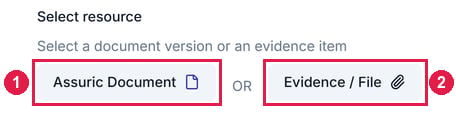
A resource is a document or evidence item you attach or link to elsewhere in Assuric. When you add one to a checklist item, for example, you choose *Assuric Document* (at a specific approved version) or *Evidence / File*.
 ## What's in this section
| Page | Covers |
| - | - |
| [Create a document](/documents/creating-a-document) | Starting a blank document, from a template or by upload, its details and permissions, and folders |
| [The Assuric document editor](/documents/document-editor) | Editing and formatting, change history, comments and live collaboration, import and export |
| [Keep documents current with placeholders](/documents/placeholders) | Inserting placeholders and cross-references, configuring live tables, and creating your own |
| [Default placeholders](/documents/default-placeholders) | Every placeholder that comes with Assuric, live tables, and what an approved version keeps |
| [Templates](/documents/templates-and-document-catalogue) | Assuric and custom templates, and making your own |
| [Document versioning](/documents/versions-and-version-history) | Approving a version, logging a minor change, republishing, and earlier versions |
| [Evidence and files](/documents/evidence) | Adding evidence, its types, and tagging it to products |
| [Documents FAQ](/documents/faqs) | Quick answers to common questions |
## What's covered elsewhere
| Covers | Where |
| - | - |
| The formal review and approval cycle for controlled documents | [Controlled documents](/quality/controlled-documents) |
| Asking staff to confirm they've read a policy | [Checklists: Overview](/people/checklists#resources-items-signing-off-a-policy) |
| Publishing a document on your Trust Centre | [Choosing what to publish](/trust-centre/what-to-publish) |
## Related articles
Start a document, set its details and organise it into folders.
Approve a version and choose where it's republished.
This documentation is built and hosted on [Mintlify](https://mintlify.com), a developer documentation platform.
## What's in this section
| Page | Covers |
| - | - |
| [Create a document](/documents/creating-a-document) | Starting a blank document, from a template or by upload, its details and permissions, and folders |
| [The Assuric document editor](/documents/document-editor) | Editing and formatting, change history, comments and live collaboration, import and export |
| [Keep documents current with placeholders](/documents/placeholders) | Inserting placeholders and cross-references, configuring live tables, and creating your own |
| [Default placeholders](/documents/default-placeholders) | Every placeholder that comes with Assuric, live tables, and what an approved version keeps |
| [Templates](/documents/templates-and-document-catalogue) | Assuric and custom templates, and making your own |
| [Document versioning](/documents/versions-and-version-history) | Approving a version, logging a minor change, republishing, and earlier versions |
| [Evidence and files](/documents/evidence) | Adding evidence, its types, and tagging it to products |
| [Documents FAQ](/documents/faqs) | Quick answers to common questions |
## What's covered elsewhere
| Covers | Where |
| - | - |
| The formal review and approval cycle for controlled documents | [Controlled documents](/quality/controlled-documents) |
| Asking staff to confirm they've read a policy | [Checklists: Overview](/people/checklists#resources-items-signing-off-a-policy) |
| Publishing a document on your Trust Centre | [Choosing what to publish](/trust-centre/what-to-publish) |
## Related articles
Start a document, set its details and organise it into folders.
Approve a version and choose where it's republished.
This documentation is built and hosted on [Mintlify](https://mintlify.com), a developer documentation platform.