

Quick summary
- Ask Assuric is Assuric’s AI assistant, with 3 modes: Auto, Hazard Log Assistant and Questionnaire Assistant.
- Ask Assuric answers from your workspace unless you choose Web. Open it with Ctrl+J or Ask in the sidebar.
- Ask Assuric is in beta, so check what it tells you: you’re accountable for what you act on or submit.
Open Ask Assuric
Click Ask at the top of the sidebar, or press Ctrl+J. A window opens on the Ask Assuric tab, next to Go to. Type a question or command and click Send, and the conversation opens as a full-page chat. You can also click the AI bubble (the sparkle button) at the top right of the page to open a floating AI Assistant panel beside your work, with the same modes, Think and source picker.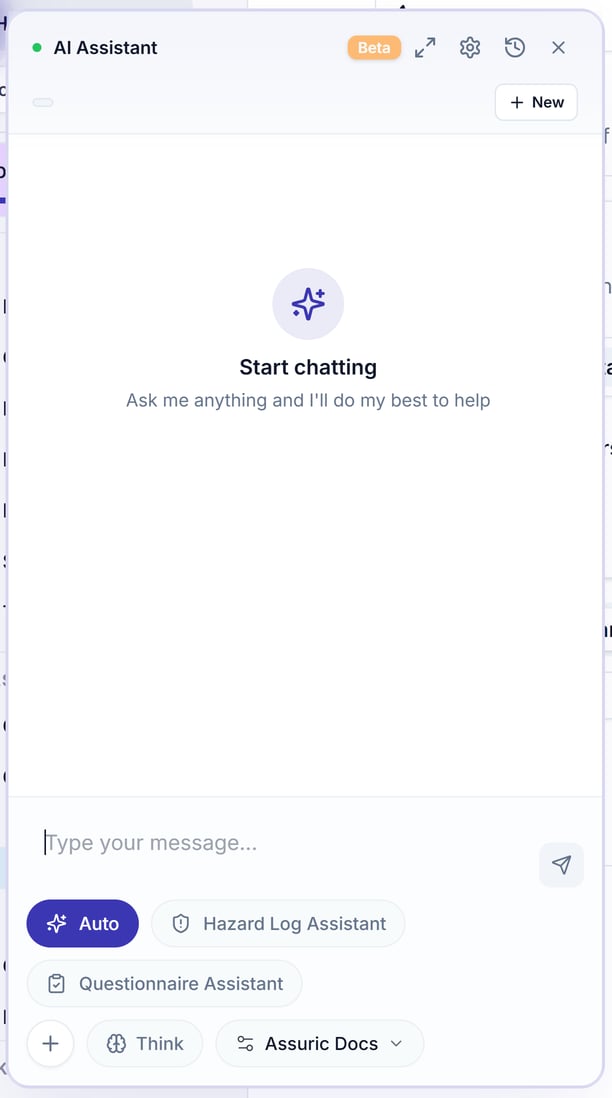
The floating AI Assistant panel, opened from the sparkle button at the top right of the page.
Choose a mode
The 3 mode buttons sit under the message box; your pick shows as a label on your message.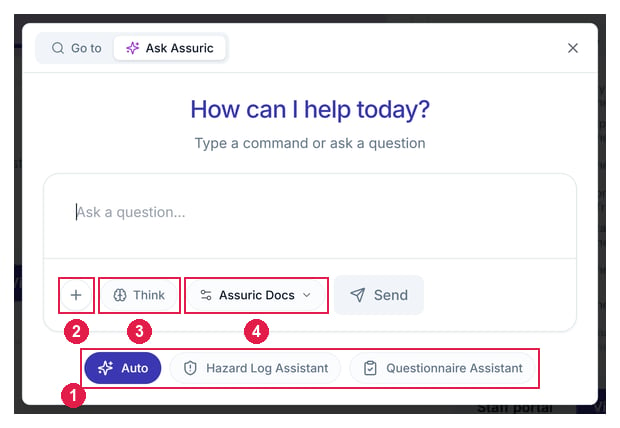
The Ask Assuric window. 1 the three modes. 2 the + button for files, documents and evidence. 3 Think. 4 the source picker, set to Assuric Docs.
Add context and choose what it searches
Under the message box:- + adds something to work with: Upload file, Add document or Add evidence.
- Think reasons through the question before it answers. It’s off until clicked. Turn it on for harder questions, such as mapping a policy to several frameworks.
- Assuric Docs is the source picker. It starts there, so answers come from your workspace. Switch it to Web to search the web instead, one source at a time.
Chat history
The full-page chat keeps every conversation in Chat History on the left, with New Chat above it. Each is titled automatically; its options let you Rename or Delete it. Under each reply, Assuric Docs answers list their sources, and Web answers list their links under Web Sources.Settings
Click the gear at the top of the chat to open Settings → AI Settings:Related articles
Ask questions about your workspace
Auto mode, Think, the Web, and your chat history.
Add hazards with the Hazard Log Assistant
Draft a hazard, cause and control and check the proposal first.
Answer security questionnaires
Paste or upload questions and get cited answers.