

Quick summary
- The Activity log, under Workspace in the sidebar, is your workspace-wide audit trail.
- The log opens on a recent window: Expand or search to look further back.
Where to find it
Activity is in the sidebar’s Workspace group.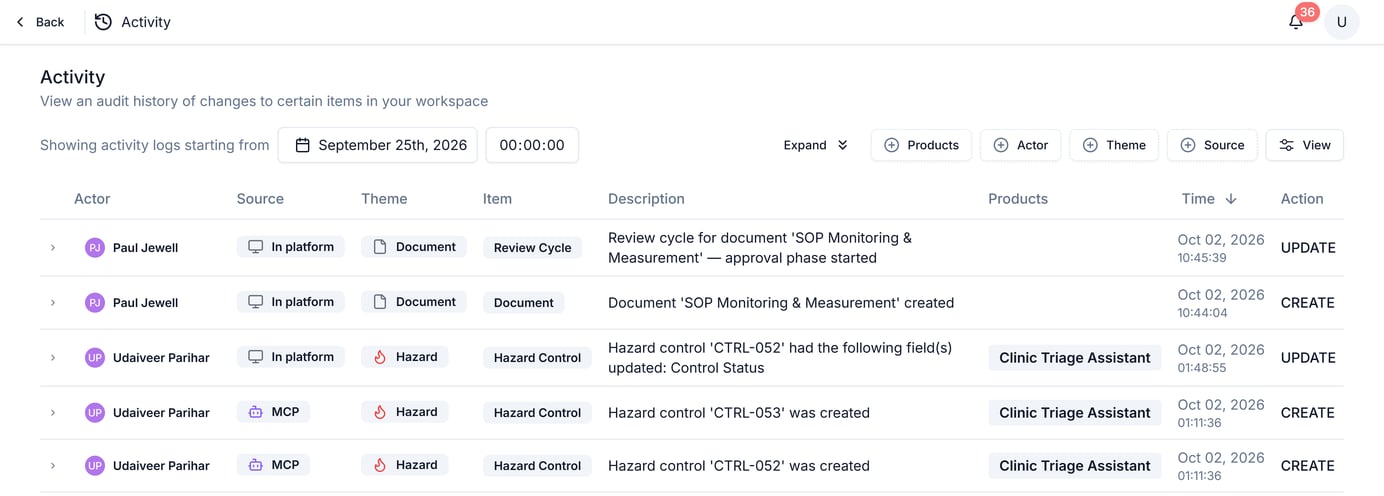
The Activity log, showing its filter row and the columns each entry carries. Source tells changes made in Assuric apart from changes made through the MCP Server.
What each entry captures
An MCP change comes from an AI assistant connected through the MCP Server and shows the name of the person who connected it.
Filter and search
Filter by Products, Actor, Theme or Source, and set a View. The log defaults to a recent window; use Expand to widen the date range. Search reaches beyond 30 days back.A narrower view, per document
A single document’s own Activity tab is this log filtered to that document.Related articles
Document versioning
The per-document view of this same log.
Settings: Overview
The rest of your workspace-wide configuration.