

Quick summary
- Every framework has its own page showing how much is complete, how many tasks are left, and a summary of where each requirement stands.
- A requirement’s status follows its tasks, but you can set it yourself, and Assuric never marks one Not applicable for you.
- One task can count towards requirements in more than one framework, so you complete it once.
Open a framework
Open a framework’s page to see its overall completion and the tasks still to do, plus two key tabs: Tasks, the work you can edit, and Requirements, the standard’s wording, which you can’t edit.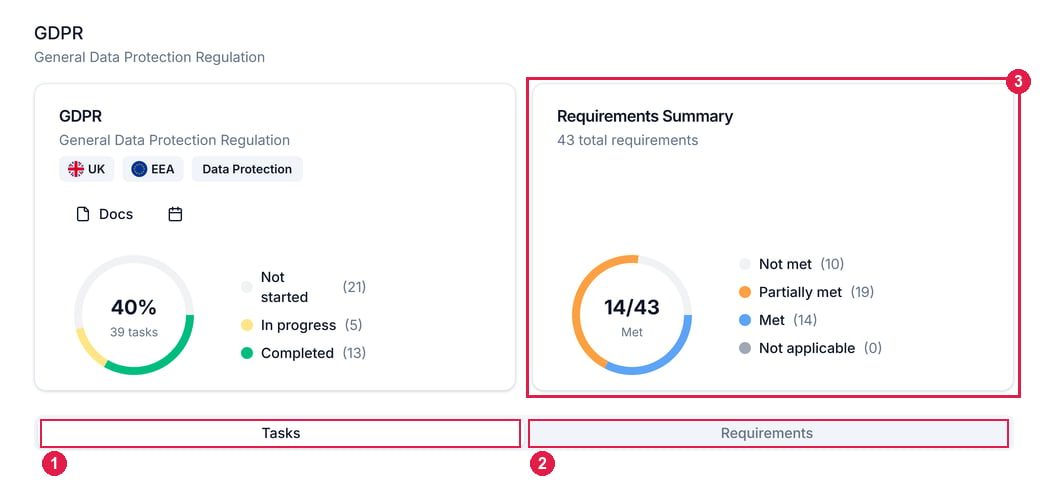
A framework page. 1 Tasks, the work. 2 Requirements, the standard's own clause list. 3 The Requirements Summary, which rolls it up.
The Requirements tab in detail
The Requirements Summary panel shows the total number of requirements and how many are in each state. Requirements are grouped by the standard’s sections, such as DTAC’s C1 - Clinical Safety. Expand a section and each requirement shows its Status and a Task Progress count of its linked tasks that are complete.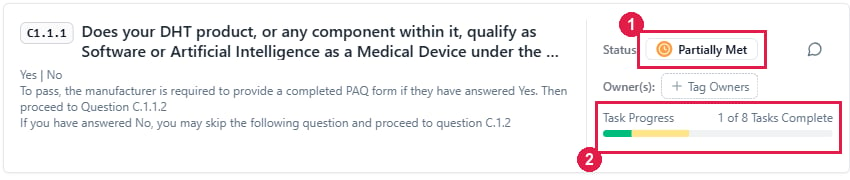
A single requirement. 1 Status, derived from its tasks. 2 Task Progress, which counts its linked tasks. More than one task can map to a single requirement.
You can also set Status yourself, so it won’t always follow task completion. Assuric never sets Not applicable: mark a requirement yourself when it doesn’t apply.
Click a requirement to open its sheet, with its guidance, comments and notes. The guidance helps you decide whether the requirement applies, and if you’re unsure, assume it does.
Mapping across frameworks
One task can satisfy several requirements, in one framework or across more than one, so you complete it once and it counts everywhere it’s mapped. To see where the credit lands, open the task: its Mapped Requirements panel lists every framework and requirement it covers.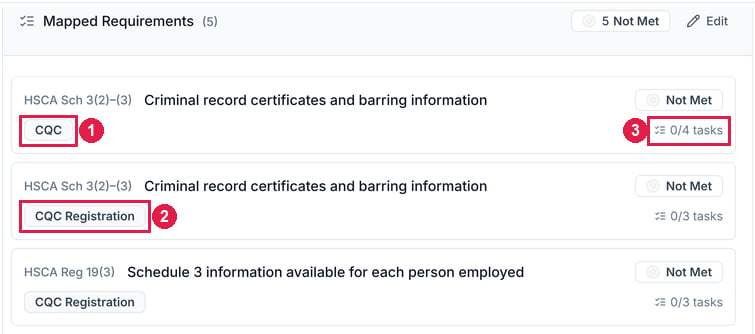
Mapped Requirements on one task. The same requirement counts under 1 CQC and 2 CQC Registration. 3 How many of that requirement's tasks are done.
Related articles
Frameworks: Overview
What a framework is, where to open it, and what’s specific to some.
Tasks: Overview
The work itself: categories, states, and how to work through it.